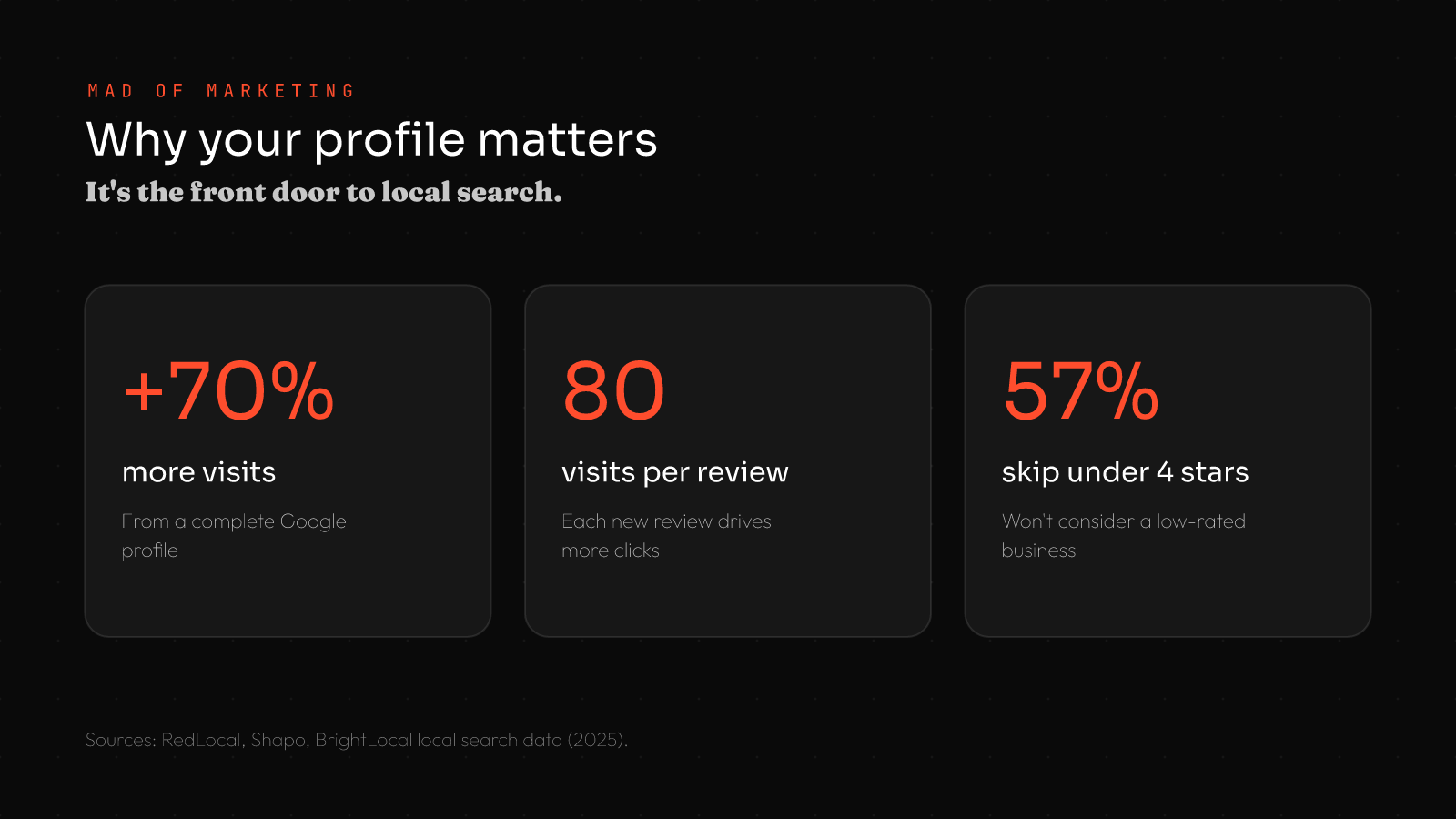
Google Business Profile optimization is the single highest-return free thing a local business can do. A complete profile gets about 70% more visits, each new review drives roughly 80 more website visits, and 57% of consumers won’t even consider a business rated under 4 stars. Claim it, complete every field, earn reviews, and stay active that’s how you win the map pack.
When someone searches for a local service, Google often answers with a map and three businesses the “local pack” before any normal results appear. Getting into that pack is worth more than almost any other local marketing, and your Google Business Profile is the lever that controls it. Yet most small businesses claim their profile, half-fill it, and forget it. Google Business Profile optimization is the difference between being the obvious local choice and being invisible.
This guide is part of our wider playbook on digital marketing for small businesses, and a deep-dive companion to our local SEO guide. Here we focus on the profile itself.
What is Google Business Profile optimization?
Google Business Profile optimization is the process of fully completing and actively maintaining your free Google business listing so it ranks higher in local search and the map pack, and converts more of the people who see it. Your profile is the box that appears on the right of search results and in Google Maps, showing your hours, photos, reviews, services, and contact details.
Optimizing it means filling in every element and keeping it fresh because Google rewards complete, active profiles, and customers trust them more.
Why Google Business Profile optimization matters
The numbers are striking:
- Complete profiles win. Businesses with a fully completed Google Business Profile get about 70% more location visits than those with incomplete ones.
- Reviews drive traffic. Each additional review can generate roughly 80 more website visits, 63 direction requests, and 16 calls.
- Ratings are a filter. 57% of consumers won’t consider a business rated below 4 stars, and 81% use Google reviews to evaluate local businesses.
- It influences rankings. Reviews and profile signals are meaningful local ranking factors, and proximity plus a complete profile heavily shape who appears in the map pack.
How to optimize your Google Business Profile in 5 steps
Most of this takes an afternoon and costs nothing but attention.
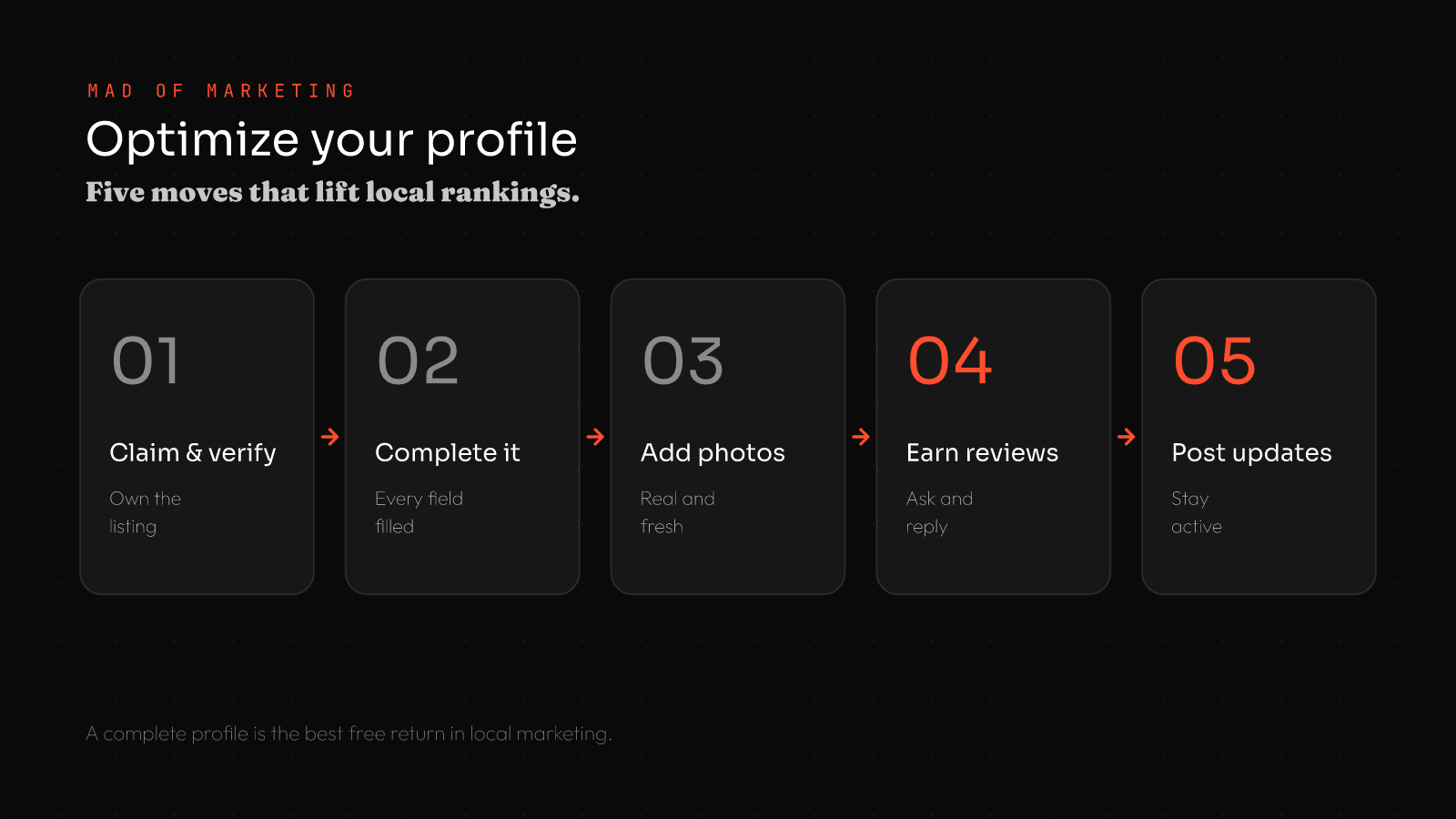
1. Claim and verify your profile
If you haven’t already, claim your business on Google and complete verification (usually by postcard, phone, or video). An unclaimed profile is an open door you can’t optimize what you don’t control, and claiming it is step one.
2. Complete every single field
This is where the 70% visit lift comes from. Fill in everything: business name, accurate categories (your primary category is a strong ranking signal), full address and service area, hours including holidays, phone, website, a keyword-rich description, services and products with descriptions, and relevant attributes. Empty fields cost you both rankings and trust.
3. Add real, fresh photos
Profiles with photos get significantly more clicks, calls, and direction requests. Add genuine photos of your premises, team, products, and work — and keep adding new ones regularly. Fresh images signal an active business and help customers choose you.
4. Earn and respond to reviews
Reviews are the biggest lever on both rankings and conversions. Ask every happy customer (make it one tap with a direct link), aim for a steady stream rather than a one-time burst, and respond to every review good and bad. Businesses that respond to reviews earn about 35% more revenue on average, and recency matters: most consumers trust reviews from the last month most.
5. Post updates and stay active
Use Google Posts to share offers, news, and events directly on your profile, answer questions in the Q&A section, and keep information current. An active profile signals to Google that your business is alive and engaged which helps you rank and keeps customers informed.
The 3 local ranking factors your profile influences
Google ranks local results on three things, and your profile touches all of them. Relevance how well your categories, services, and description match the search (complete fields help enormously). Distance how close you are to the searcher, which accurate location and service-area settings inform. Prominence how well-known and trusted you are, driven heavily by your volume and quality of reviews. You can’t move your business, but optimizing relevance and prominence is usually enough to climb into the pack and that’s almost entirely within your control.
Google Business Profile features worth using
Most businesses fill in the basics and stop but the features they skip are exactly the ones that lift rankings and conversions. Put these to work:
- Google Posts. Publish offers, updates, and events that show directly on your profile and keep it active — a signal Google rewards.
- Q&A. Seed and answer common questions yourself before someone else answers them incorrectly for you.
- Products and services. List them with descriptions and prices each entry is another chance to match a search.
- Messaging. Let customers message you directly from your profile, capturing leads who prefer not to call.
- Attributes. Highlight what makes you relevant “women-owned,” “wheelchair accessible,” “free parking” to match filtered searches.
- Booking links. If you take appointments, connect a booking link so customers can act instantly.
Each feature you activate makes your profile more complete, more useful, and more competitive in the map pack.
How to track your profile’s performance
Google Business Profile gives you free performance insights use them. You can see how many people found you, what searches they used to reach you, and the actions they took: website clicks, calls, direction requests, and messages. Watch these month to month: rising views and calls mean your optimization is working, while flat numbers signal something needs attention perhaps more reviews, fresh photos, or better categories.
Pay attention to the search terms people use to find you, too; they reveal which services to emphasize and which keywords to add. This data turns Google Business Profile optimization from guesswork into a measurable channel you can steadily improve, and connects directly to your broader local SEO efforts.
Common Google Business Profile mistakes
- Leaving it incomplete. The most common and costly mistake half-filled fields tank rankings and trust.
- Wrong or inconsistent details. A mismatched name, address, or phone across the web confuses Google.
- Ignoring reviews. Not asking, or never responding both hurt rankings and conversions.
- No photos. Skipping the visuals that drive clicks and calls.
- Set and forget. Never posting, updating, or adding fresh content.
- Keyword-stuffing the name. Adding keywords to your business name violates Google’s rules and risks suspension.
How your profile fits your wider marketing
Your Google Business Profile is the cornerstone of local SEO and feeds directly into your online reputation. The reviews you collect there power your credibility everywhere, the traffic it drives lands on your website, and it’s some of the highest-intent, lowest-cost visibility you’ll ever get — which keeps your overall digital marketing ROI strong. For most local businesses, it’s the first thing to get right.
How long does it take to see results?
Google Business Profile optimization is one of the faster-moving channels in marketing. Completing your profile and adding photos can improve visibility within days to a few weeks, because Google quickly recognizes a more complete, active listing. Climbing into a competitive local map pack overtaking established competitors for your priority searches usually takes two to three months of consistent effort: a steady stream of recent reviews, regular posts, fresh photos, and accurate, consistent information across the web.
The key word is consistent. A profile you optimize once and abandon will slowly lose ground to competitors who keep theirs active. Treat it as an ongoing habit a few minutes each week to add a photo, post an update, and respond to new reviews and your rankings and customer actions compound over time. It’s a rare channel where modest, sustained effort produces outsized, lasting returns.
Frequently asked questions
What is Google Business Profile optimization?
It’s fully completing and actively maintaining your free Google business listing so it ranks higher in local search and the map pack and converts more viewers. It covers your categories, photos, reviews, posts, and every profile field.
Why is Google Business Profile optimization important?
Because it controls whether you appear in the local map pack, which dominates local search. Complete profiles get about 70% more visits, reviews drive traffic and rankings, and 57% of consumers skip businesses rated under 4 stars.
How do I rank higher in the Google map pack?
Complete every field accurately, choose the right primary category, add fresh photos, earn a steady stream of recent reviews and respond to them, keep your details consistent across the web, and post updates regularly. Relevance, proximity, and prominence decide rankings.
How many Google reviews do I need?
More is better, but recency and a rating above 4 stars matter most 57% of consumers avoid businesses below 4 stars and most trust recent reviews more. Aim for a steady, ongoing flow rather than a one-time push.
Is a Google Business Profile free?
Yes creating, verifying, and optimizing your Google Business Profile is completely free. It’s one of the highest-return free tools available to a local business. The only cost is the time to complete it and keep it active with reviews, photos, and posts.
Can I optimize my profile myself?
Absolutely. Claiming, completing, and maintaining your profile takes attention rather than technical skill, and most owners can do it themselves. Competitive markets sometimes benefit from professional help with reviews, content, and ongoing management, but the fundamentals are firmly DIY.
Is Google Business Profile the same as Google My Business?
Yes Google My Business was renamed Google Business Profile, so they refer to the same free listing. You now manage it directly through Google Search and Maps rather than a separate app, but the optimization principles are exactly the same.
The bottom line on Google Business Profile optimization
Google Business Profile optimization is the highest-return free move in local marketing. Claim and verify your profile, complete every field, add real photos, earn and respond to reviews, and stay active with posts and updates. Do that and you’ll climb into the local map pack, win more clicks and calls, and become the obvious choice for customers searching nearby.
Want us to optimize your profile and local presence? Book a free strategy call or explore our services.
Sources: RedLocal Agency, Shapo, BrightLocal local search statistics (2025). Figures are industry averages and vary by source.